

Building an animated website sounds exciting. You picture smooth scroll effects, playful hover animations, and a homepage that feels alive. But behind every polished animated site is a real project with real phases, real decisions, and a real price tag.
Most animated website projects go sideways for the same reason: no one mapped out what actually needs to happen before the work starts. Clients expect quick turnarounds. Agencies underestimate the animation work. Everyone ends up frustrated.
This guide breaks the whole thing down in simple terms. You’ll learn the phases, the realistic timelines, the costs, and the planning work that makes or breaks these projects. Whether you’re hiring someone or getting hired, you’ll walk away knowing what to expect.
Who Is This Guide For?
This post is written for two types of readers, and both perspectives are woven throughout:
If you’re a client looking to hire someone to build an animated website, this guide helps you understand what you’re paying for, what to ask, and how to avoid surprises.
If you’re a freelancer or agency selling animated website projects, this guide helps you structure your process, set client expectations, and price your work with confidence.
What Is an Animation Website Project Breakdown?
An animation website project breakdown is a clear map of how an animated website gets built from start to finish. It shows the phases, what happens in each one, who does what, and how long each part takes.
Think of it like a recipe. You wouldn’t start cooking without knowing the steps or the ingredients. A project breakdown works the same way. It turns a vague idea like “we want an animated website” into a clear, trackable plan.
For clients: It tells you what you’re paying for at each stage and when to expect deliverables.
For agencies and freelancers: It’s the roadmap that keeps the project on track and protects you from scope creep.
Why You Need a Plan Before You Start Animating
Animation isn’t something you bolt on at the end. When it’s treated that way, things break. Here’s why planning matters for both sides of the table.
- Animations added without a plan become messy and expensive to redo. When animations aren’t mapped out early, they end up feeling random and disconnected. Fixing that later usually means redoing design work.
- Clients who don’t plan spend more on revisions. Every major change after development starts costs extra time and money. A clear plan reduces that risk by a lot.
- Agencies without structure lose time and money. Scope creep happens when no one writes down what’s included. A structured project breakdown sets boundaries from day one.
The 7 Phases of an Animated Website Project
Every animated website project, no matter the size, goes through these seven phases. Understanding each one helps both sides stay aligned, avoid delays, and create a smoother final experience. Animated websites involve much more than adding effects at the end, successful motion design requires planning from the very beginning.
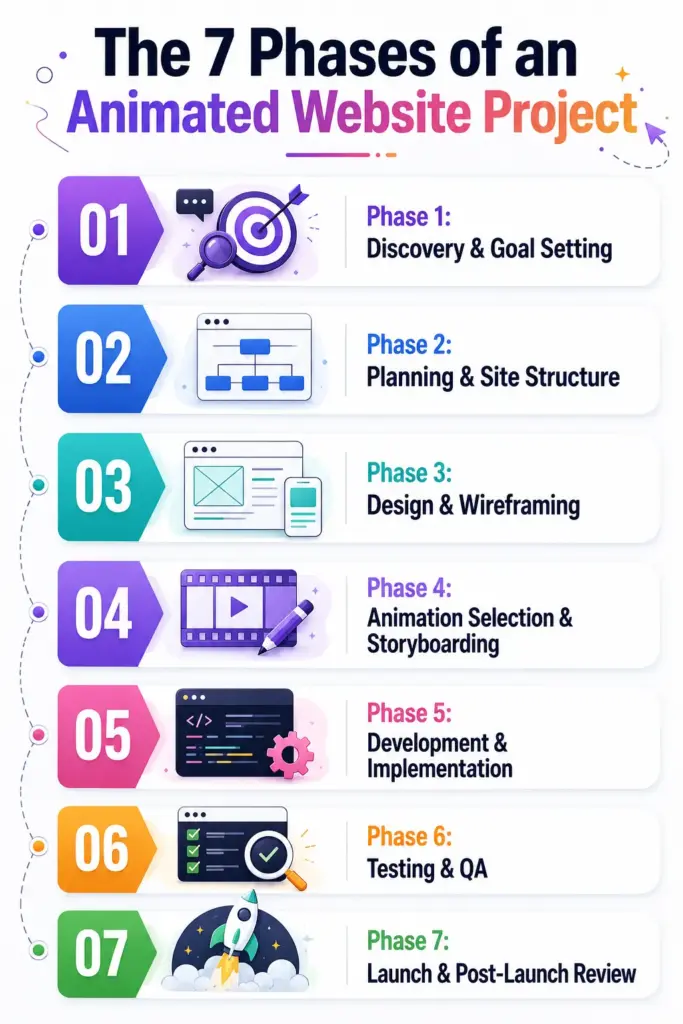
Phase 1: Discovery & Goal Setting
This is where you define the website’s purpose, target audience, and the role animations will play in the overall experience. Some websites need subtle motion to improve usability, while others rely on bold interactive storytelling to build brand identity.
Client tip: Come to the first meeting with reference sites you like and a clear idea of what success looks like.
Agency tip: Use this phase to scope animation complexity. It’s easier to adjust expectations now than mid-project.
A strong discovery phase prevents confusion later. When goals are unclear, animations often become random visual effects instead of purposeful design elements.
Phase 2: Planning & Site Structure
Map out all pages and sections. Decide where animations will appear: hero areas, scroll sections, hover effects, buttons, page transitions, or interactive elements. This is also when the sitemap gets built. Skipping this step is one of the biggest sources of delays later because animations are heavily connected to layout structure and user flow.
A good project plan also identifies technical limitations early. For example, some advanced effects may impact performance on mobile devices, so decisions should be made before development begins.
Phase 3: Design & Wireframing
Designers create layouts with animation intent baked in. If a hero section is going to have a scroll animation, the layout needs to account for spacing, timing, and movement from the start. Wireframes come first, then high-fidelity mockups. Clients should sign off on both before moving forward.
This phase is not just about visual beauty, it is about creating a structure that supports motion naturally. Good animated websites feel smooth because the design and animation were planned together, not separately.
Phase 4: Animation Selection & Storyboarding
Now comes the motion strategy. Decide which animation types to use in each section: fade-ins, parallax, scroll triggers, hover effects, loading animations, text reveals, or more advanced sequences.
This is where a good agency will ask tough questions like: Do we really need this animation, or is it just for looks?
Every animation should serve the user. Storyboarding can also help clients visualize timing and movement before development starts. Even simple motion sketches or prototypes reduce misunderstandings and improve communication between designers and developers.
Phase 5: Development & Implementation
This is usually the longest phase. Developers build the site and add animations based on the approved plan. Performance optimization also becomes important here, especially for animation-heavy websites.
Client tip: Avoid requesting major changes during development. It resets timelines and adds cost.
Agency tip: Lock animation scope before development begins. Put it in writing.
A well-organized development phase focuses not only on visuals but also on smooth performance, clean code, responsiveness, and maintainability.
Phase 6: Testing & QA
Animations get tested across devices, browsers, and screen sizes. Page speed is checked. Accessibility is verified because some users prefer reduced-motion experiences. If animations are choppy on mobile, conflict with browser behavior, or slow down load time, this is when those issues get fixed.
Testing should never be rushed. Even beautiful animations can ruin user experience if they feel laggy, distracting, or inconsistent across devices.
Phase 7: Launch & Post-Launch Review
The site goes live. Analytics are set up. Performance is monitored for the first few weeks because some issues only appear during real-world usage. Budget for a short post-launch review period so small bugs can be fixed without stress or emergency revisions.
This phase is also valuable for learning. Agencies can analyze how users interact with animated sections, which effects improve engagement, and which animations may need refinement later. The best animated websites continue evolving even after launch.
How Long Does an Animated Website Actually Take to Build?
The honest answer: it depends on complexity. Here’s a realistic breakdown by project type.
| Project Type | Estimated Time |
| Simple landing page with basic animations | 2 to 4 weeks |
| Business site (5 to 15 pages) with scroll effects | 4 to 8 weeks |
| Portfolio or creative site with heavy animation | 8 to 12 weeks |
| Complex site with custom GSAP or scroll-driven animation | 3 to 5 months |
What Makes Timelines Longer?
A few common factors push animation projects past their deadlines.
- Slow client feedback at review stages
- Animation decisions made late instead of early
- Major changes requested after development starts
- Complex animation types like parallax or custom GSAP sequences
- Platform limitations that force custom workarounds
Animation work is sequential. Each phase depends on the one before it being approved. If feedback takes a week instead of a day at any stage, the whole timeline shifts by that much. Build review windows into your schedule from the start, and everyone stays happier.
How Much Does an Animated Website Cost?
Cost is the question everyone wants answered first. It’s also the most misunderstood part of the process.
The same animated website can cost 3x to 10x more depending on who builds it, how complex the animations are, and what platform is used. Here’s the breakdown.
Pricing by Who Builds It
| Who Builds It | Hourly Rate | Typical Project Cost |
| DIY (no-code tools) | — | $7 to $30 per month |
| Freelancer | $15 to $40/hr | $300 to $2,000+ per project |
| Small agency | $40 to $80/hr | $3,000 to $15,000 |
| Premium agency | $80 to $120+/hr | $15,000 to $30,000+ |
Pricing by Animation Complexity
| Animation Level | What It Includes | Estimated Cost |
| Basic | Fade-ins, simple hover effects | $300 to $800 |
| Intermediate | Scroll triggers, entrance animations | $800 to $3,000 |
| Advanced | Parallax, GSAP sequences, custom interactions | $3,000 to $10,000+ |
| Premium | Full scroll-driven storytelling, cinematic motion | $10,000 to $30,000+ |
What Affects the Final Cost?
Several factors push the price up or down:
- Number of animated sections and pages
- Animation complexity (CSS animations are cheaper than custom GSAP)
- Platform choice (WordPress, Webflow, or custom-coded)
- Number of revision rounds included
- Timeline — rush projects cost more
- Content readiness — missing assets slow things down and add cost
A Note for Clients
You’re not just paying for motion. You’re paying for planning, design decisions, development time, testing, and post-launch support. A cheap quote that skips those phases usually leads to a site that needs rebuilding within a year.
Ask what’s included in the quote. If planning and testing aren’t part of it, you’ll pay for them eventually.
A Note for Agencies & Freelancers
Always scope animation complexity before quoting. A site with 30 animated sections is not the same project as one with 5, even if the page count looks similar. Price animation work separately from layout and content work, and put every animation type in writing.
Fixed-scope contracts protect both sides. Hourly rates work better when the animation direction is still being explored.
Animation Website Project Breakdown Template
Here’s a simple, reusable template you can copy for any animated website project. It works for both clients who want to track progress and agencies who want a clear process.
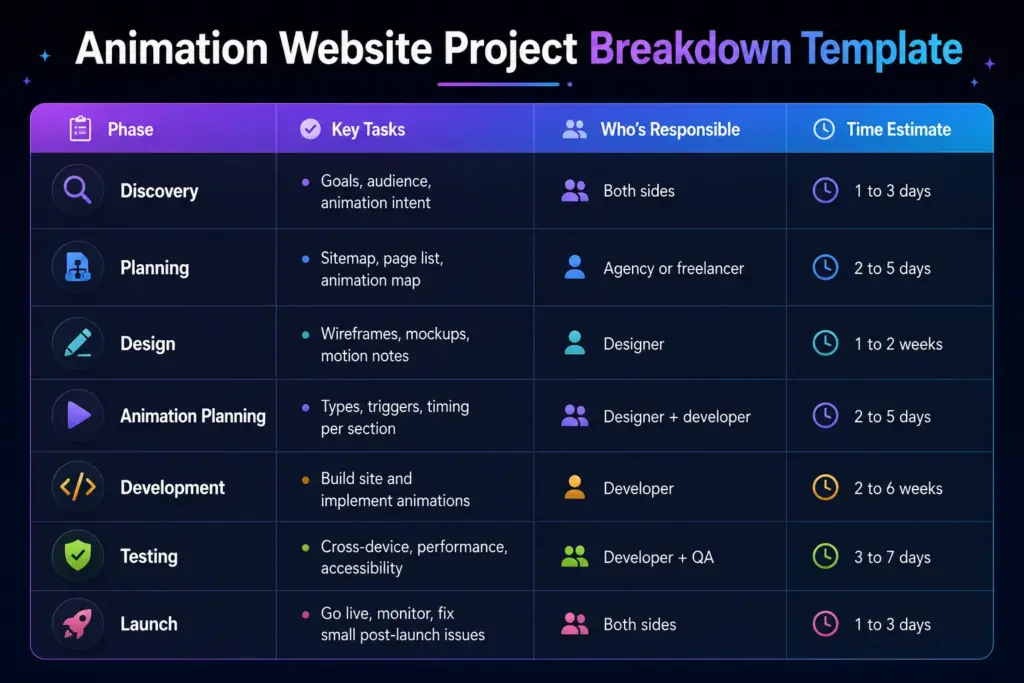
Save this template. Use it on every project. Both sides benefit when expectations are clear.
Animation Website Project Checklist: What to Plan Before You Start
A solid pre-project checklist prevents most of the headaches that come up later. Here’s what each side should have ready.
If You’re the Client — Before You Brief an Agency
- Know your website goal (what should visitors do)
- Have a list of pages and sections ready
- Collect 3 to 5 reference sites showing the animation style you like
- Set a realistic budget range before the first call
- Decide who will approve designs internally (one decision-maker is ideal)
- Know your launch deadline and whether it’s flexible
If You’re the Agency or Freelancer — Before You Start Building
- Get a signed brief or scope document
- Map which sections need animation and what type
- Confirm the platform supports the animation types planned
- Set review milestones and approval windows in the contract
- Test the animation approach on mobile before committing to a design direction
- Plan for accessibility with a reduced motion fallback
Both Sides — Before Launch
- Test on at least 3 devices (desktop, tablet, mobile)
- Run a page speed test with animations enabled
- Get one final approval sign-off before going live
- Set up analytics to track performance post-launch
Common Mistakes That Derail Animation Website Projects
A few patterns show up again and again on projects that go badly. Avoid these and you’ll save everyone a lot of stress.
Approving designs then requesting major changes later
One of the biggest reasons animation projects go over budget is late-stage redesigns. Once development begins, even a “small” visual change can force developers to rebuild timelines, transitions, layouts, and interactions from scratch. Motion design is deeply tied to structure. Agencies and clients should spend extra time reviewing wireframes, mockups, and animation references before approving anything.
Not locking animation scope before development
Animation projects can quickly become chaotic when the scope is unclear. Without a locked animation scope, developers are forced into endless revisions and expanding workloads. Every animation should be documented clearly before coding starts, including where it appears, how it behaves, and what tools will be used. A defined scope protects both the agency and the client from confusion, delays, and unexpected costs later in the project.
Skipping mobile testing until the last minute
Animations that feel smooth on a large desktop monitor may perform poorly on mobile devices. Text can overlap, timing can feel too fast, and heavy effects may cause lag. Waiting until the final launch phase to test mobile responsiveness often leads to rushed fixes and compromised quality. Smart teams test animations across screen sizes from the very beginning of development. This helps maintain consistent performance, readability, and usability across all devices.
Treating animation as decoration
Good animation is not just visual flair, it serves a purpose. Motion should help users understand interactions, guide attention to important content, provide feedback, or strengthen brand personality. When animations are added only because they “look cool,” they often become distracting and reduce usability. Overused motion can slow down navigation, overwhelm visitors, and even hurt accessibility. The best web animations feel natural and intentional.
A Simpler Way to Add Animations
Tools like Motion Kit make it easier to add professional animations to a website without writing custom code. It works with popular platforms like WordPress and handles things like scroll effects and interactive animations through a visual interface. For clients wanting animations on a tighter budget, or freelancers who want to deliver polished motion without hand-coding everything, it’s worth a look.
Conclusion
An animated website isn’t just a design job. It’s a structured project with phases, timelines, costs, and decisions that affect the final result. When both sides understand the breakdown like discovery, planning, design, animation selection, development, testing, and launch, projects run smoother and everyone gets what they paid for.
Clients end up with a site that actually performs well. Agencies deliver without burning out on revisions. Nobody gets blindsided by timelines or budgets.
The goal isn’t to follow a rigid process, it’s to make sure nothing important gets skipped. Good planning is what separates animated sites people love from animated sites that frustrate everyone involved.
FAQs
How do I know if a quote for an animated website is fair?
Ask what’s included. A fair quote covers discovery, planning, design, development, testing, and launch support. If the quote skips phases or doesn’t list animation types, ask for a breakdown. Compare 2 or 3 quotes to get a realistic sense of the market.
What information should I give a designer before they start?
Share your website goal, target audience, a list of pages, 3 to 5 reference sites, brand assets (logo, fonts, colors), and a rough budget. The more context you give upfront, the fewer rounds of back-and-forth you’ll have later.
How many animations should a website actually have?
Less than you think. Most good sites use 5 to 10 intentional animations total, not one on every element. Animations should guide the eye to important content, not distract from it. When in doubt, remove one.
Can animations be added to a website that’s already built?
Yes, but it depends on the platform and how the site was built. Adding animations to an existing WordPress or Webflow site is usually possible. Adding them to a poorly structured custom site can be more expensive than rebuilding it.
Do I need to know how to code to add animations to my WordPress site?
No. Visual animation tools now let non-developers add scroll effects, hover animations, and more without touching code. You can get professional results with the right plugin or builder, especially for common animation styles.

Leave a Reply