

You just got off a call with a client. They want a website that “moves like Apple.” You know exactly what they mean. But when you try to explain what that involves and why it costs more, they go quiet.
This is one of the most common problems designers and agencies face. Animation is hard to explain in words. Clients either don’t understand what they’re asking for, or they don’t see why it takes time and planning to get right.
The good news is, there are clear, proven ways to bridge that gap. This guide walks you through how to communicate animation value clearly, so clients say yes, budgets get approved, and the project actually goes well.
Why Explaining Animation in Words Never Works
Think about the last time someone described a song to you. No matter how well they explained it, you had no idea if you’d actually like it until you heard it.
Animation is the same. When you tell a client, “We will add scroll-triggered fade-ins on the hero section,” they nod along but they have no real picture of what that means or why it matters.
Words create misunderstanding. A client hears “subtle animation” and imagines something very different from what you are planning. This is how scope creep and revision spirals start.
The fix is simple: stop describing animation and start showing it.
Why Designers Struggle When Clients Want a Premium Animated Website
When a client says they want something that looks a high-end interactive website, they are not really asking for a specific animation style. They are asking for a premium, clean, trustworthy, and polished.
The problem is that premium animated website is like a reference to hundreds of design decisions working together. The typography, spacing, scroll pacing, color choices, and motion design all work as one system. You can’t copy just the animation and expect the same result.
Designers get stuck because they try to respond to the words instead of uncovering the feeling behind them. A better move is to ask: “Can you show me two or three sites that gave you that feeling?”
This shifts the conversation from abstract words to concrete examples. Now you have something real to work with.
What a Good Animation Website Project Breakdown Looks Like
One of the biggest reasons clients push back on animation budgets is that they don’t fully understand how much planning, design, development, and testing go into creating a polished animated website. A clear project breakdown helps solve that problem. It gives clients visibility into the process, explains why animation projects take more time than standard websites, and builds trust from the beginning.
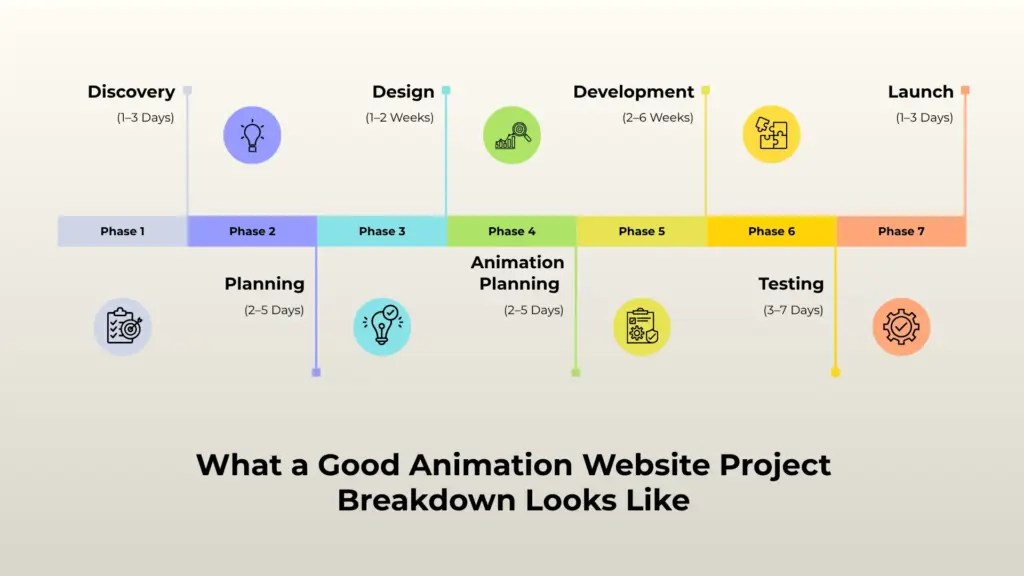
Here’s an example of how to structure an animation website project in a way clients can easily understand and follow.
Discovery (1–3 Days)
This phase is all about understanding the purpose of the website before any design or animation work begins. Discuss the client’s goals, target audience, brand personality, and the emotional experience they want visitors to feel when using the site.
Some clients may want subtle, elegant motion, while others may want bold interactive storytelling. This is also the stage where reference websites are collected and discussed.
Reviewing examples helps align expectations early and prevents confusion later in the project. By the end of discovery, both sides should clearly understand what “animated website” means for this specific project.
Planning (2–5 Days)
Once the direction is clear, the next step is organizing the structure of the website. Create a sitemap outlining all pages and major sections. Then identify which parts of the site will include animation and how users will interact with them.
This is where an “animation map” becomes useful. The animation map documents where animations appear, what type of motion will be used, and when animations should trigger such as on scroll, hover, click, or page load.
Proper planning at this stage helps avoid unnecessary revisions during development.
Design (1–2 Weeks)
During the design phase, wireframes and high-fidelity mockups are created to establish the visual direction of the website. Layouts, typography, colors, imagery, and spacing are finalized while keeping animation in mind from the beginning.
Motion notes should also be added directly into the design files so developers clearly understand how each element is expected to behave.
Simple annotations like “fade in on scroll,” “slide from left,” or “button pulses on hover” make collaboration smoother and reduce guesswork later in the process.
Animation Planning (2–5 Days)
This phase focuses specifically on refining the motion experience. Instead of simply deciding that something will animate, the team defines the exact details that make the animation feel intentional and polished.
For each animated section, determine the animation style, duration, easing, trigger point, and interaction behavior. Consistency is extremely important here.
Smooth, coordinated motion across the entire website creates a professional user experience, while random or inconsistent animation can make the site feel chaotic and distracting.
Development (2–6 Weeks)
This is where the website is fully built and the animations are implemented. Compared to standard web projects, animation-heavy websites usually require more development time because motion effects need careful coding, optimization, and testing.
Developers must ensure animations perform smoothly across different screen sizes, browsers, and devices without slowing down the site.
Responsive behavior is especially important because animations that work well on desktop may need adjustments for tablets and mobile devices.
Testing (3–7 Days)
Testing is one of the most important phases of an animation website project. Every animation should be reviewed across multiple browsers, operating systems, and screen sizes to ensure consistent performance.
This phase also includes checking page speed, responsiveness, accessibility, and usability. Heavy or poorly optimized animations can negatively impact loading time and user experience, so performance testing is critical.
Mobile testing is especially important to make sure animations remain smooth without breaking layouts or interactions.
Launch (1–3 Days)
After testing is complete, the website is prepared for launch. Final checks are performed, files are optimized, and the site is deployed to the live server.
Even after launch, monitoring is necessary during the first few days. Small issues sometimes appear only after real users begin interacting with the site.
Quickly fixing these problems helps ensure a smooth transition and a professional final delivery.
Why This Breakdown Matters
Sharing a clear project breakdown like this before work begins helps clients understand where their budget and timeline are going. It sets realistic expectations, reduces confusion, and makes the entire collaboration process much smoother.
Most importantly, it shows that animation is not just decorative, it requires strategy, planning, design thinking, development expertise, and extensive testing to create an experience that feels polished and intentional.
How to Discuss Animation Project Costs Clearly With Clients
Most designers underprice animation work because they struggle to explain why it adds real value to a project. Clients often see animation as a “nice extra” instead of understanding the strategy, planning, development time, and user experience improvements behind it.
A strong project breakdown helps justify the cost, but these additional approaches make pricing conversations much easier and more professional.
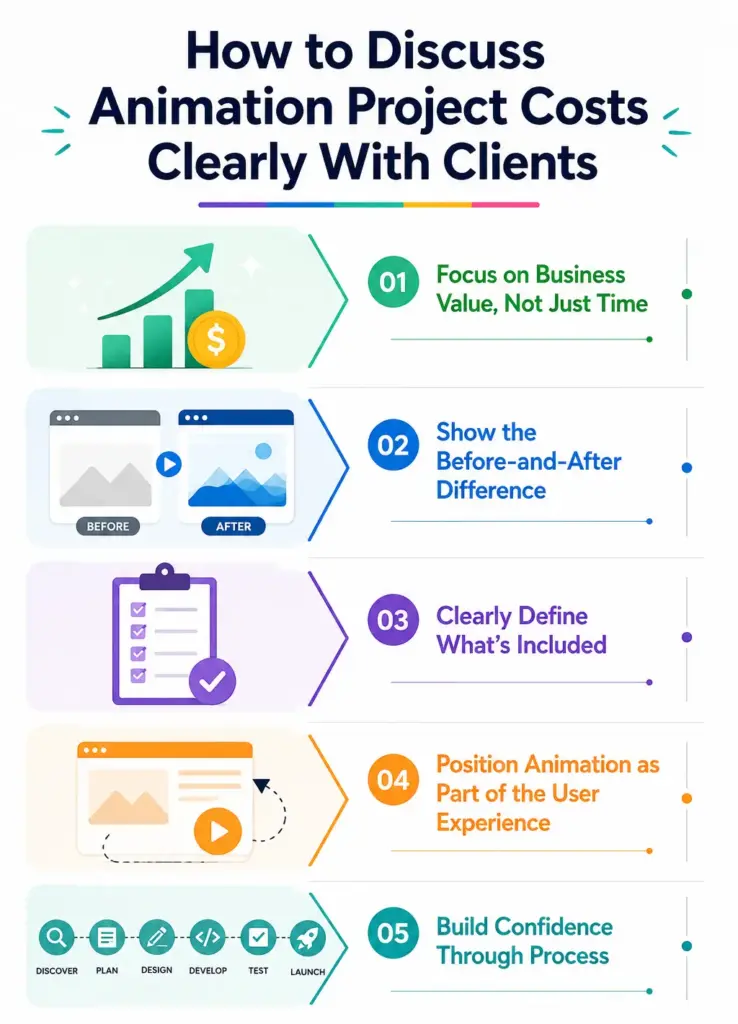
Focus on Business Value, Not Just Time
One of the biggest mistakes designers make is explaining animation pricing only in terms of hours. Clients usually don’t care how long something takes, they care about what they gain from it.
Instead of saying, “Animation takes more time to build,” connect the work directly to business outcomes. Explain how motion can improve user engagement, guide attention to important content, make the brand feel more premium, and increase the amount of time visitors spend on the website.
When clients understand the impact rather than just the effort, pricing becomes easier to justify.
Show the Before-and-After Difference
Animation is much easier to sell when clients can visually compare the difference. A static design and an animated version of the same page create completely different user experiences.
Whenever possible, show side-by-side examples, short demo videos, or interactive previews. Seeing a page come to life with motion instantly helps clients understand the added value without needing a long explanation.
Demonstrating the experience is often more persuasive than trying to describe it verbally.
Clearly Define What’s Included
Unclear project scopes are one of the main reasons animation projects become stressful for both designers and clients. If animation details are vague, clients may assume “everything moves,” while the designer may only plan for a few animated sections.
To avoid misunderstandings, clearly explain exactly what is included in the project. Mention how many sections will have animation, the types of interactions being added, which devices will be optimized, and how many revision rounds are covered in the pricing.
Being specific creates better expectations from the start and prevents scope later in the project. It also makes the pricing feel more structured and professional instead of random or inflated.
Position Animation as Part of the User Experience
Another helpful mindset shift is to stop presenting animation as decoration alone. Good website animation is part of the overall user experience design.
Motion can guide users through content, highlight calls to action, improve storytelling, and make interactions feel smoother and more intuitive. When used correctly, animation helps users understand the interface more naturally instead of simply making the site “look cool.”
Clients are far more willing to invest when they see animation as a functional design tool rather than an optional visual effect.
Build Confidence Through Process
Clients feel more comfortable paying higher prices when they can clearly see the process behind the work. Breaking down the project into stages like discovery, planning, motion strategy, development, testing, and launch makes the work feel intentional and organized.
A professional process builds trust. And when trust increases, pricing conversations become far less awkward.
Common Mistakes When Presenting Animation to Clients
Many project issues happen not because the animation itself is bad, but because expectations were never properly aligned from the beginning. Avoiding these common mistakes can make communication smoother and help projects run far more successfully.
Using Too Much Technical Jargon
One of the fastest ways to confuse a client is by overloading them with technical animation terms. Phrases like “scroll-triggered parallax,” “easing curves,” or “micro-interactions” may make perfect sense to designers and developers, but most clients are unfamiliar with this language.
Instead of focusing on technical terminology, explain animations in simple, visual terms. For example, say “elements smoothly appear as users scroll down the page” rather than describing the exact animation technique.
Clear communication helps clients feel more confident and involved in the decision-making process.
Skipping the Visual Reference Stage
Trying to explain an animation concept without showing examples often leads to misunderstandings. Clients may imagine something completely different from what the designer intends.
That’s why visual references are extremely important. Show examples from other websites, quick motion mockups, or simple prototypes before discussing details.
Seeing the animation in action helps clients understand the direction immediately and makes feedback far more accurate. In most cases, showing is much more effective than explaining.
Failing to Define the Scope Early
Animation projects can quickly become difficult when the scope is not clearly defined at the beginning. Statements like “we’ll add some animations later” are too vague and leave too much open to interpretation.
Instead, clearly define which sections will include animation, what types of motion will be used, and how users will interact with them. You should also outline revision limits and any additional animation requests that may require extra time or budget.
A detailed scope prevents confusion and helps both the client and designer stay aligned throughout the project.
Treating Animation as a Last-Minute Add-On
One of the most common mistakes is treating animation as something that can simply be added after the website design is finished. In reality, the best animated websites are planned with motion in mind from the very beginning.
Animation affects layout, spacing, storytelling, user flow, and even performance decisions. When motion is integrated early into the design process, the final experience feels smooth and intentional.
But when animation is added at the last minute, it often feels disconnected, rushed, or unnecessary.
A Note on Tools That Make This Easier
One reason the animation conversation feels complicated is that building animation demos and prototypes used to require significant development time. That made it harder to show clients concepts before committing to the full build.
Tools like Motion Kit are changing that. Motion Kit lets you add scroll and interactive animations directly on WordPress without writing code. This makes it much easier to put together a quick demo page for a client call, or to show animation concepts on a real site before the full build is complete.
Conclusion
Explaining animation value to a client comes down to one thing: stop using words and start showing. Clients don’t understand animation descriptions, but they immediately understand a reference site they can scroll through, a screen recording you narrate, or a small demo page with real motion.
A clear project breakdown also removes the budget conversation awkwardness. When clients can see the phases, the time involved, and the outcomes they’re buying, saying yes becomes much easier.
The more you make animation tangible and visible early in the process, the smoother the rest of the project goes. Get alignment before the build, and you’ll spend far less time on revisions after it.
FAQs
How do I explain animation value to a non-technical client?
Skip the technical terms. Show reference sites, use screen recordings, or build a small demo. Seeing real motion answers the question faster than any description.
What should I include in an animation website project breakdown?
A solid breakdown covers discovery, planning, design with motion notes, animation planning, development, testing, and launch. Include who’s responsible and how long each phase takes.
How do I show a client what animations will look like before building?
Share reference sites, record a narrated screen walkthrough, or create a simple one-page demo using a tool like Motion Kit. Visual examples work far better than written descriptions.
Why do clients ask for high-end interactive animations?
They are describing a feeling, not a specific animation style. Ask them to share sites that give them a similar feeling. That gives you real examples to work from.
How do I justify the extra cost of animation to a client?
Connect animation to outcomes they care about longer time on site, stronger first impressions, higher conversion rates. Use a detailed project breakdown to show exactly what the extra budget covers.

Leave a Reply