

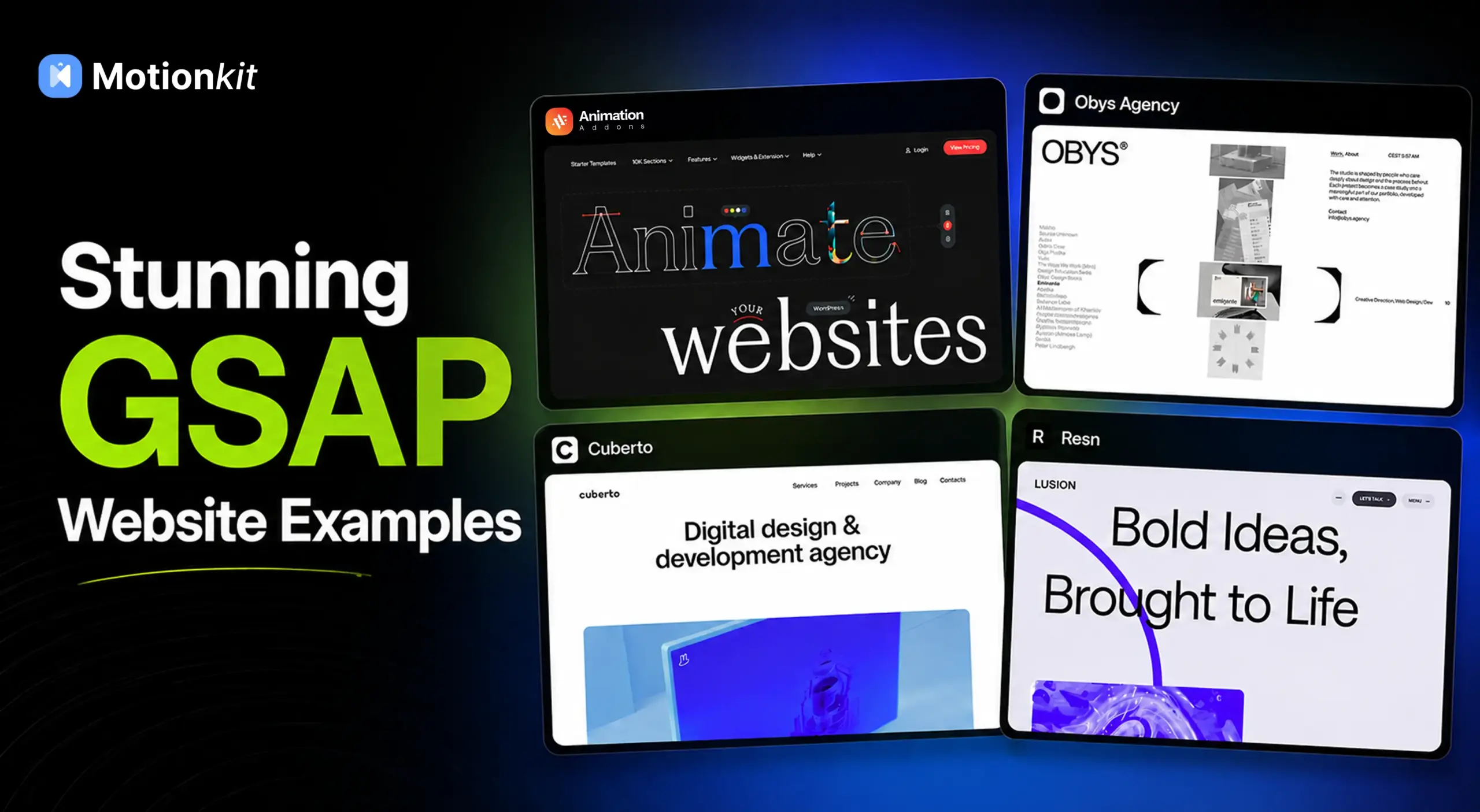
Looking for the best GSAP website examples for inspiration? You’re in the right place.
GSAP (GreenSock Animation Platform) powers some of the most impressive websites on the internet.
Websites using GSAP showcase a wide range of creative possibilities. They feature scroll-triggered animations, animated typography, immersive storytelling, and interactive experiences.
As one of the most powerful JavaScript animation libraries available today, GSAP helps developers create smooth animations, engaging interactions, and visually stunning digital experiences.
In this guide, we’ll explore 15 of the best GSAP website examples, analyze the animation techniques they use, and discover what makes these websites stand out.
If you’re searching for GSAP website inspiration, these examples will give you plenty of ideas for your next project.
What Makes a Great GSAP Website?
The best websites using GSAP have one thing in common. They use animation purposefully.
Instead of adding motion purely for decoration, they use animations to improve storytelling, guide user attention, strengthen branding, and enhance the overall user experience.
Many of the best GSAP websites use:
- Scroll-triggered animations
- Animated typography
- Interactive storytelling
- Smooth page transitions
- Parallax effects
- Custom cursor interactions
- Dynamic content reveals
In the next section, we’ll explore some of the most inspiring examples.
15 Stunning Examples of GSAP Web Design
The examples below showcase a wide range of GSAP animation techniques. You’ll see scroll-triggered effects, animated typography, interactive storytelling, page transitions, and immersive user experiences.
Explore how each website uses motion to improve engagement, usability, and visual appeal.
1. Animation Addons
Animation Addons helps WordPress users create advanced GSAP-powered animations without writing code.
The website itself demonstrates modern animation techniques through interactive sections, smooth transitions, scroll-triggered effects, and engaging motion design.
Why It Stands Out
- Advanced GSAP-powered animations
- Interactive scrolling effects
- Modern UI animations
- Performance-focused design
Design Takeaway
Complex animations don’t always require custom development. The right tools can help designers create professional motion effects visually.
2. Obys Agency
Obys Agency is widely known for its creative typography animations and immersive scrolling experience. Every interaction feels intentional, creating a premium browsing experience.
Why It Stands Out
- Animated typography
- Scroll-based storytelling
- Creative transitions
- Strong visual identity
Design Takeaway
Typography animations can dramatically improve engagement when used strategically.
3. Cuberto
Cuberto combines smooth transitions, interactive elements, and custom cursor animations to create a visually engaging user experience.
Why It Stands Out
- Custom cursor interactions
- Smooth page transitions
- Interactive layouts
- Modern visual design
Design Takeaway
Small interactions often create the biggest impact on user experience.
4. Lusion
Lusion showcases how animation and storytelling can work together to create immersive digital experiences.
Why It Stands Out
- Cinematic scrolling effects
- Interactive storytelling
- Seamless transitions
- Premium presentation
Ideas to Apply
Animations should support a story rather than simply decorate a page.
5. OLIPOP
OLIPOP is a great example of how a modern eCommerce brand can use GSAP animations to create an engaging and interactive shopping experience.
From animated product reveals and scroll-triggered effects to smooth transitions and dynamic content movement, the website keeps visitors engaged while maintaining excellent usability.
Why It Stands Out
- Scroll-triggered animations
- Animated product showcases
- Dynamic content reveals
- Smooth page transitions
Ideas to Apply
Thoughtful animations can make product-focused websites more engaging. They help guide visitors through the customer journey. At the same time, they do so without distracting from the shopping experience.
6. Resn
Resn is famous for creating experimental digital experiences that combine creativity, motion, and storytelling.
Why It Stands Out
- Interactive experiences
- Innovative motion design
- Creative navigation
- Dynamic visual effects
Ideas to Apply
Motion can become a powerful part of a brand’s identity.
7. Locomotive
Locomotive demonstrates how smooth scrolling and layered animations can improve the browsing experience.
Why It Stands Out
- Smooth scrolling effects
- Parallax animations
- Layered content reveals
- Premium visual design
Ideas to Apply
Subtle motion often feels more professional than excessive animation.
8. MakeReign
MakeReign uses thoughtful animations to enhance usability and visual appeal.
Why It Stands Out
- Elegant transitions
- Purpose-driven animations
- User-focused interactions
- Modern layouts
Ideas to Apply
Animations should always support usability goals.
9. Bürocratik
Bürocratik creates award-winning digital experiences using advanced animation techniques and storytelling principles.
Why It Stands Out
- Scroll-triggered storytelling
- Motion-driven experiences
- Strong visual hierarchy
- Creative interactions
Ideas to Apply
Animation can help transform ordinary content into engaging experiences.
10. Dogstudio
Dogstudio combines immersive storytelling with creative motion design to deliver memorable digital experiences.
Why It Stands Out
- Interactive storytelling
- Dynamic content reveals
- Smooth animations
- Creative design approach
Ideas to Apply
Every animation should have a purpose within the user journey.
11. Cosmos Studio
Cosmos Studio uses modern motion design to create visually appealing and interactive experiences.
Why It Stands Out
- Creative scroll effects
- Smooth transitions
- Modern layouts
- Interactive user experience
Ideas to Apply
Motion design can improve both aesthetics and engagement.
12. Studio Freight
Studio Freight focuses on creating elegant experiences through subtle animation and smooth interactions.
Why It Stands Out
- Refined transitions
- Minimalist motion design
- Scroll-triggered effects
- User-centered experience
Design Takeaway
Not every animation needs to be dramatic to be effective.
13. Immersive Garden
Immersive Garden creates highly engaging websites that blend storytelling, interaction, and animation.
Why It Stands Out
- Rich visual experiences
- Interactive elements
- Motion-based storytelling
- Creative presentation
Design Takeaway
Animation can guide users through a narrative and increase engagement.
14. Dennis Snellenberg
Dennis Snellenberg’s portfolio is a great example of how subtle GSAP animations can enhance a personal website.
Why It Stands Out
- Smooth page transitions
- Scroll-triggered animations
- Clean design
- Excellent performance
Design Takeaway
Simple animations often create the most polished user experiences.
15. Monopo | London
Monopo combines creative design with motion to create visually engaging digital experiences.
Why It Stands Out
- Animated content reveals
- Creative storytelling
- Modern visual design
- Smooth interactions
Design Takeaway
Thoughtful animation can strengthen both branding and user engagement.
Common GSAP Animation Techniques Used by These Websites
After exploring these examples, you’ll notice several recurring animation techniques.
While each website has its own style, many of them rely on similar motion design principles to create engaging user experiences.
Scroll-Triggered Animations
Scroll-triggered animations reveal content as users move through a page. This technique helps create a more dynamic browsing experience and keeps visitors engaged throughout their journey.
Animated Typography
Many websites use animated typography to make headlines and key messages more impactful. Text animations help capture attention and reinforce a website’s visual identity.
Text Reveal Effects
Text reveal animations gradually introduce content through fades, slides, masks, or character-by-character effects. They are commonly used to improve storytelling and create a sense of anticipation.
Parallax Scrolling
Parallax effects create depth by moving elements at different speeds during scrolling. When used carefully, they can make layouts feel more immersive and visually appealing.
Interactive Cursor Effects
Custom cursor animations add another layer of interaction to a website. These effects encourage engagement and make user interactions feel more responsive.
Page Transitions
Smooth page transitions help create a seamless experience when navigating between pages. They can make websites feel more polished and professional.
Storytelling Through Motion
Many of the websites featured in this collection use animation to guide users through a narrative. Motion helps present information in a more engaging and memorable way.
Horizontal Scrolling Sections
Instead of traditional vertical scrolling, some websites use horizontal sections to showcase content. This approach can create a unique browsing experience and highlight important information more effectively.
Micro-Interactions
Small animations triggered by user actions, such as hovering, clicking, or scrolling, help make websites feel more interactive. These subtle details often have a significant impact on the overall user experience.
When used thoughtfully, these techniques can improve engagement, guide user attention, strengthen storytelling, and create memorable digital experiences.
Final Thoughts
GSAP continues to set the standard for modern web animation. The websites featured in this collection demonstrate how motion can be used to create engaging experiences, strengthen branding, improve storytelling, and guide user attention.
The most effective GSAP websites don’t rely on animation simply because they can. Instead, they use motion strategically to support content, improve usability, and create memorable interactions.
As you explore these examples, pay attention to how they balance creativity with usability. The goal isn’t to copy what others have built but to understand the principles behind successful motion design and apply them to your own projects.
FAQs
Can GSAP be used with WordPress?
Yes. GSAP can be integrated into WordPress websites directly through custom development or by using tools and plugins that provide GSAP functionality without requiring extensive coding.
Does GSAP affect website performance?
When implemented properly, GSAP is highly optimized and performs efficiently. However, excessive animations or poorly optimized assets can still impact performance.
Is GSAP beginner-friendly?
Yes. Beginners can start with simple animations and gradually explore more advanced features. The extensive documentation and community resources make it easier to learn.
Can GSAP be used without coding?
GSAP itself requires JavaScript knowledge. However, some website builders and WordPress plugins provide visual interfaces that allow users to create GSAP-powered animations without writing code.
What types of websites use GSAP?
GSAP is commonly used for portfolios, agency websites, SaaS platforms, product landing pages, eCommerce stores, creative studios, and interactive storytelling experiences.

Leave a Reply